Ten stages from brief to delivery.
The production studio. Every stage reads and writes the same project, from the brief to the final cut.
One project. One library.
Pick the agent once, Claude, Grok or OpenAI, and every agentic step uses it. Every render, upload and build lands in the project’s library.
Brief & Script
One stage for the brief and the script. The agent you pick writes the script from the brief, draft → critique → refine; send notes for another draft until you approve one. Screenplay or ad-film mode; PDF (up to 400 pages), TXT or Fountain in, with local OCR and per-page review for scans.
BriefScript editorDraft → critique → refineNotes → redraft → approveImport · PDF · TXT · Fountain · OCRAd-film modeClaude · Grok · OpenAIBeats & Shots
The agent breaks the approved script into scenes, beats and shots: a beat sheet you edit by hand, and the script can be redrafted to play the edited beats. Or upload a beat sheet PDF instead. Acts on a board or a graph; the shots feed Storyboards.
ScenesBeatsShotsActsBoard · GraphBeat sheet PDFRedraft from beatsStoryboards
A frame for every shot on the beat sheet. The agent writes the prompts; frames render as live action, a coloured sketch or a black-and-white sketch. Upload a rough drawing and the agent reads it, so the frame keeps its blocking.
Frame promptsLive actionColoured sketchB&W sketchLine drawingsRevise selectedFrames → RigEnvironment
Where the world is built, before the cast. The rules every place shares, then each place, from the beat sheet, the agent or by hand, with plates rendered here, uploaded or taken from the library. Plates are filed as Environment for the Rig and Gen.
World rulesPlacesPlatesRender · Upload · LibraryReferences · up to 6Filed as EnvironmentCast & Elements
The cast list comes from the beat sheet, or from the agent with a prompt per entry. Characters, environments and props keep their names, prompts and reference images in one list.
CASTCharacters from a prompt and a reference image.
PromptReference imageELEMENTS · ENVIRONMENTEnvironments and props, listed the same way.
EnvironmentPropAstra 3D
Blocking before rendering. A 3D scene editor, with objects, project pictures and GLB models, lights, the camera and keyframes, plus bounded planner proposals, reviewed native Blender scripts and cloud renders: a PNG still, the .blend and, where it exports, a GLB. Send a render to the Rig as a new shot’s first frame.
Scene editorTemplatesGLB inProposalsNative BlenderRender · PNG · .blend · GLBPortable exportSend to RigRig
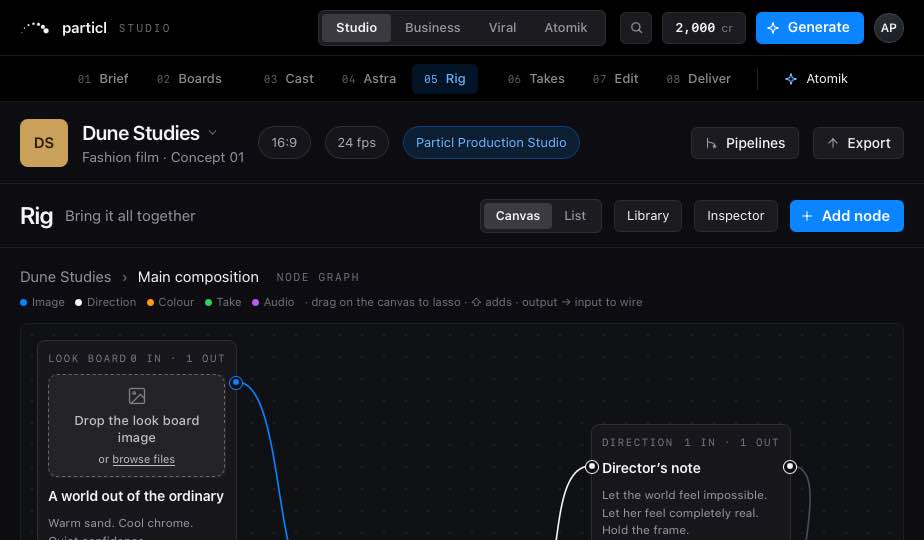
Resolves references and dispatches each shot to a video engine. Build one shot per storyboard frame; each takes a prompt of up to 20,000 characters, notes, inputs from uploads, the library, earlier shots and the cast, and a first frame. List or canvas; the canvas is shared with the team.
Build from StoryboardsPrompt · 20,000 charactersInputsFirst frameList · CanvasTeam canvasBuild another rigTakes
Every take of the project first, then every asset by type. A video take opens in Seedance Edit and a still is re-edited from an instruction; any take goes to the cut or starts another rig. Transcribe a take, speakers apart, with subtitles.
GenerationsAll assetsSeedance Edit · 2.5 · 2.0Re-edit a stillTranscribe · .srtAdd to the cutBuild a rigEdit & Sound
Assembles the takes, then writes dialogue, effects and music against the cut. Voice-over, sound effects and music land at the playhead; change a voice or dub one language at a time. Sixty-four timed clips with gain, pan, fades, mute and solo, mixed on the device to a stereo 48 kHz WAV.
The cutAssemblyDialogueSound effectsMusicChange voiceDubUpload a trackMix · 64 clipsWAV · 48 kHzDeliver
Delivery runs against the spec saved on the project: 24, 25 or 30 fps, where a new rate retimes the cut, and 16:9, 9:16, 1:1 or 4:5. The final movie renders in the browser as MP4 or WebM at 720p or 1080p, up to three minutes and 200 MB. The package carries a CMX3600 straight-cut EDL, FCPXML, Premiere XML, the source media and a manifest.
24 · 25 · 30 fps16:9 · 9:16 · 1:1 · 4:5Final movie · MP4 · WebM · ≤ 3 minEDL · CMX3600FCPXML · Premiere XMLPackage · ≤ 200 MB
 PLACE · PLATE 2SELECTED
 CAST · CHARACTERREFERENCE
Direction or media. Wrong or circular wires are refused.
Drop a picture or a take on a shot to make it an input.
Every take of a shot is a version. Undo is 20 deep.
One room. One composer.
Every tool is a preset that opens the same composer. Assets are visible and draggable on every page.
The same room on every page.
Library on the left, Inspector on the right, one composer, one prompt enhancer. Every card is a button; nothing dead-ends in a toast.
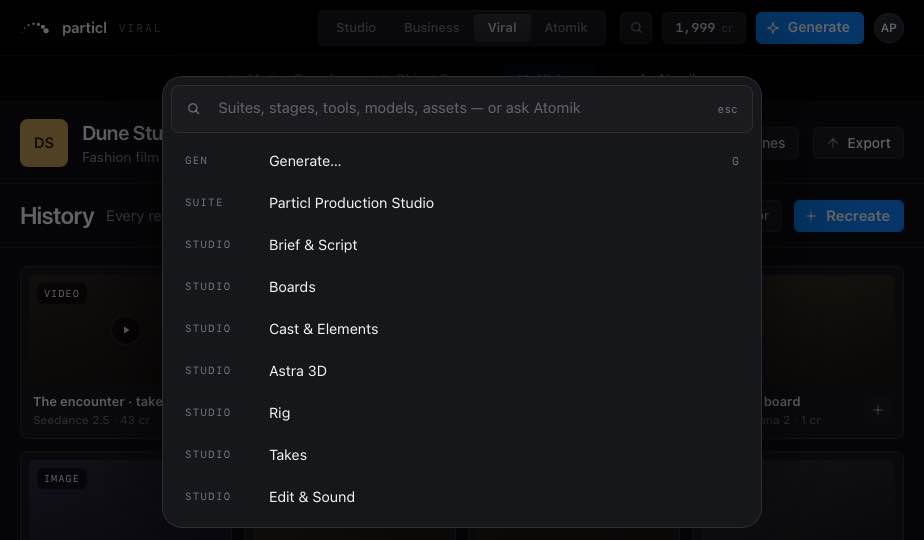
Recent projects, saved projects, a new one. A project is one brief and one cast across every suite; switching suites waits for pending saves.
Generate, suites, every page, Workspace, models, assets and “Ask Atomik: …”. Enter runs the top hit.
On every stage. Every tile drags onto any reference well or Rig node. Download original is always the original bytes.
Controls, Inputs and Versions for whatever is selected: asset, take, run, node, item or stage.
Copy, cut, paste, duplicate, move to, retry, and a 20-deep undo.
One provider, chosen in Workspace › General. Never on raw: prompts.
The same room, one hand.
Home · Workflow · Canvas · Takes · Edit in a glass tab bar, stage sheets that pull up over the work. Every tap target is at least 44 px.
Credits, not seats.
1 credit = US$0.80. Plans differ on credits and features, never headcount.
Invite-only, built for small teams.
A stranger with an invite gets from email to first render in five minutes. Invites are one-time links, sent by a person.
Already invited? Sign in